

- Why Telegram Keeps Logging You Out of All Devices Automatically
- What Telegram Deletes After Logging You Out of All Devices
- Can You Recover Deleted Telegram Messages After Being Logged Out
- Telegram Automatically Logged You Out - Step-by-Step Recovery
- Telegram Logged Out Multiple Accounts at Once: Damage Control for Automation Teams
- How to Prevent Telegram from Logging You Out Again
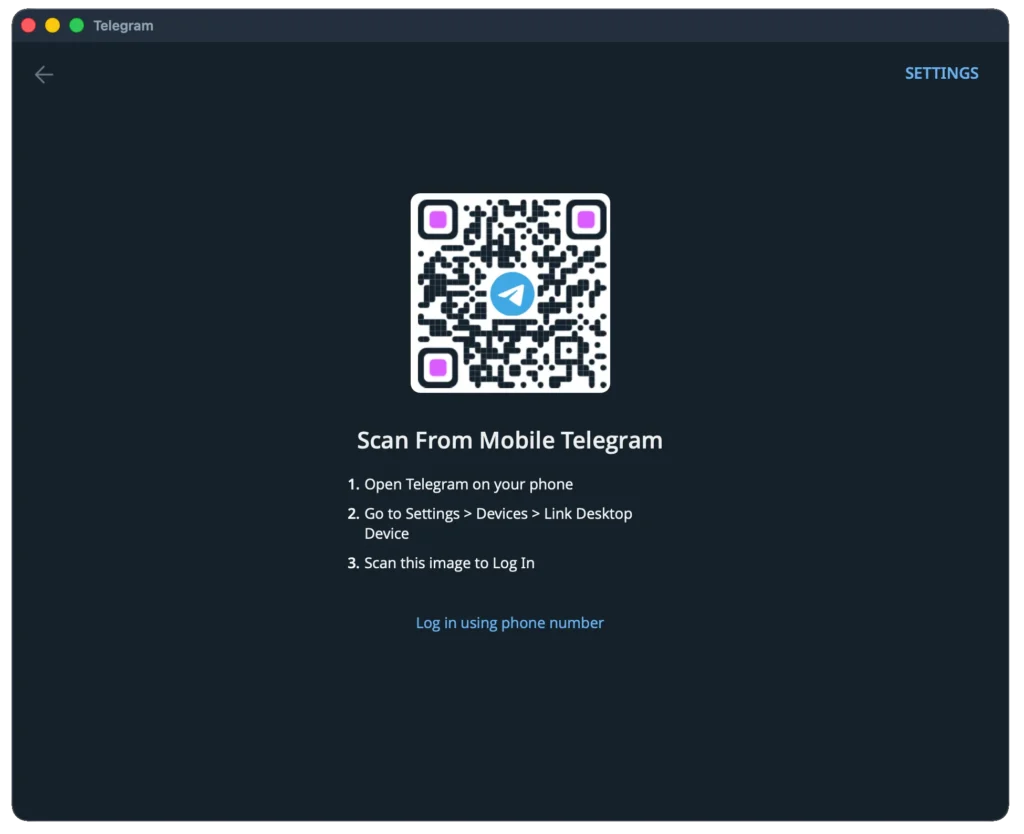
Telegram terminates every active session at once, without warning and without sending a notification – phone, desktop, and web client all lose access simultaneously. If Telegram logged out of all devices on your account, phone number verification is the only way back in. QR codes stop working. Saved sessions on other devices stop working. The messenger holds the account in a locked state until you confirm ownership via SMS or a code delivered to another Telegram client on the same number. Since 2024, Telegram runs an AI-driven behavioral monitoring system that identifies usage patterns it classifies as suspicious and triggers a global session reset automatically. This article covers why Telegram keeps logging you out, what data the messenger removes afterward, and exactly how to restore access without losing more than necessary.
Why Telegram Keeps Logging You Out of All Devices Automatically #
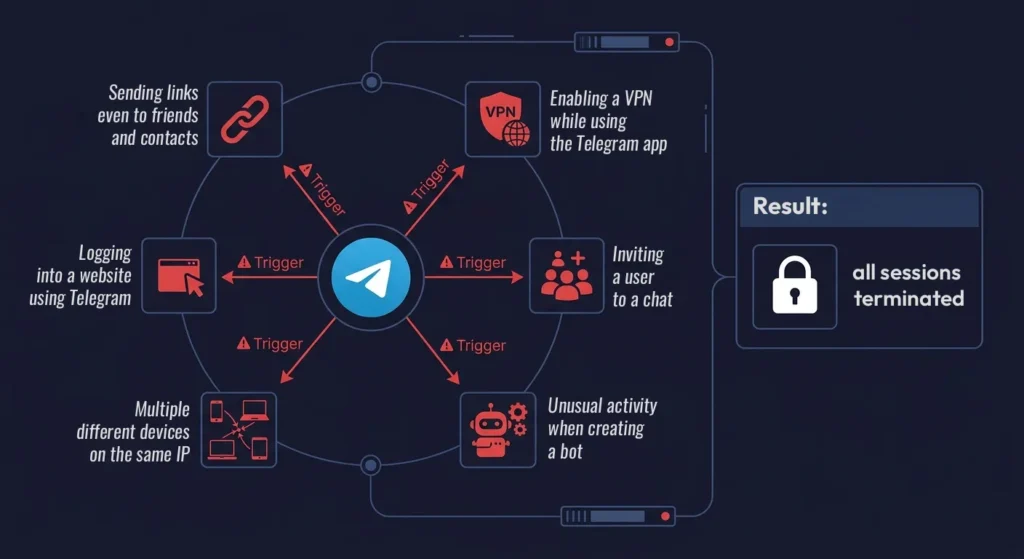
Telegram’s AI filter reads behavioral signals across sessions in real time and terminates all of them the moment it detects a pattern it flags as coordinated or abusive. The reset is global – when the system fires, Telegram signed out of all devices connected to the account at the same instant, regardless of activity. The filter does not distinguish between bulk outreach and routine private messaging; it reads patterns, not intent. Documented triggers include sending a link to a new contact, joining a group that sits under an anti-spam layer, enabling a VPN at the exact moment a bot gets created, and logging into the same account from two different IP addresses simultaneously. That last trigger catches many users off guard: opening one account on two devices from separate networks causes an immediate full session wipe, while opening the same account from two devices on one shared network does not. Telegram does not publish the trigger criteria anywhere in its documentation, which makes the behavior difficult to predict and harder to avoid.
The AI filter produces false positives at a measurable rate. A documented case: an account was kicked out after sending one URL to a personal contact who had explicitly asked for that link. No broadcast, no group actions, no suspicious login. The behavioral context around the message – not the message itself – triggered the session wipe.
Why did Telegram log me out when I was just having a normal conversation? The system flags patterns across the entire account history, not the individual message. An account that recently joined several groups, received a new contact, and then sent a link creates a combined signal that the filter reads as suspicious, even when each action looks innocent in isolation. Enabling a VPN mid-session – especially during bot creation or group setup – is another well-documented trigger. A second but less obvious cause is incorrect device parameters set during session creation. If the session was created with an inaccurate OS version string – for example “Windows 11” instead of “Windows 11 x64” – or through an outdated client such as Telegram 3.x while the current version is 11+, the account enters a frozen state within 10 to 15 minutes due to API incompatibility. Repeating the triggering action immediately after re-login produces a second reset, sometimes within hours.
What Telegram Deletes After Logging You Out of All Devices #
After a forced session reset, Telegram runs an automated deletion sequence on a portion of account data. The deletion window changed significantly in 2024: previously, the messenger took three days to complete the removal; now it wipes the affected content within one day. The cascade extends beyond the targeted account – if two or more accounts run on the same physical machine and one triggers a forced reset, Telegram removes one day of messages from every account on that device. This group deletion behavior means a single account’s session reset can silently destroy message history across an entire shared workstation. After the restriction lifts, notification settings bound to the specific device reset to factory defaults – the values that existed at account registration. Cloud-stored profile data, contacts, and username remain intact.
| What Telegram removes | Timeframe | Notes |
|---|---|---|
| Outgoing messages across all dialogues | Within 1 day | Before 2024 this window was 3 days |
| Bots created from the account | Last 30 days exactly | Only bots created within 30 days of the logout event |
| Messages on all accounts sharing one device | Within 1 day | Fires when 2+ accounts run on the same physical machine |
| Device-specific notification settings | At unban | Reset to the defaults set at account registration |
The 30-day bot deletion rule catches most users unprepared. Telegram removes every bot created from the affected account within the 30 days preceding the logout event – the bot’s creation timestamp determines the cutoff, not the logout date. Ten bots created over the past month disappear permanently. This rule applies regardless of how actively the bots were used or how many users they had accumulated. Account recovery from a telegram account recovery standpoint is possible for profile data, but assets created inside that 30-day window are gone with no retrieval path.
Can You Recover Deleted Telegram Messages After Being Logged Out #
Telegram provides no native tool to restore messages removed after a forced session reset. The messenger does not maintain user-accessible backups of deleted conversations anywhere on its infrastructure. Once the deletion window closes, the data is gone permanently – no setting, no support ticket, and no third-party application changes that outcome.
Services advertising paid Telegram message recovery run without any technical basis. Telegram’s API does not expose deleted server-side message data to external applications. Any service claiming otherwise takes payment for a result it cannot deliver.
The only protection is a backup strategy set up before a forced logout occurs. Here is what actually works:
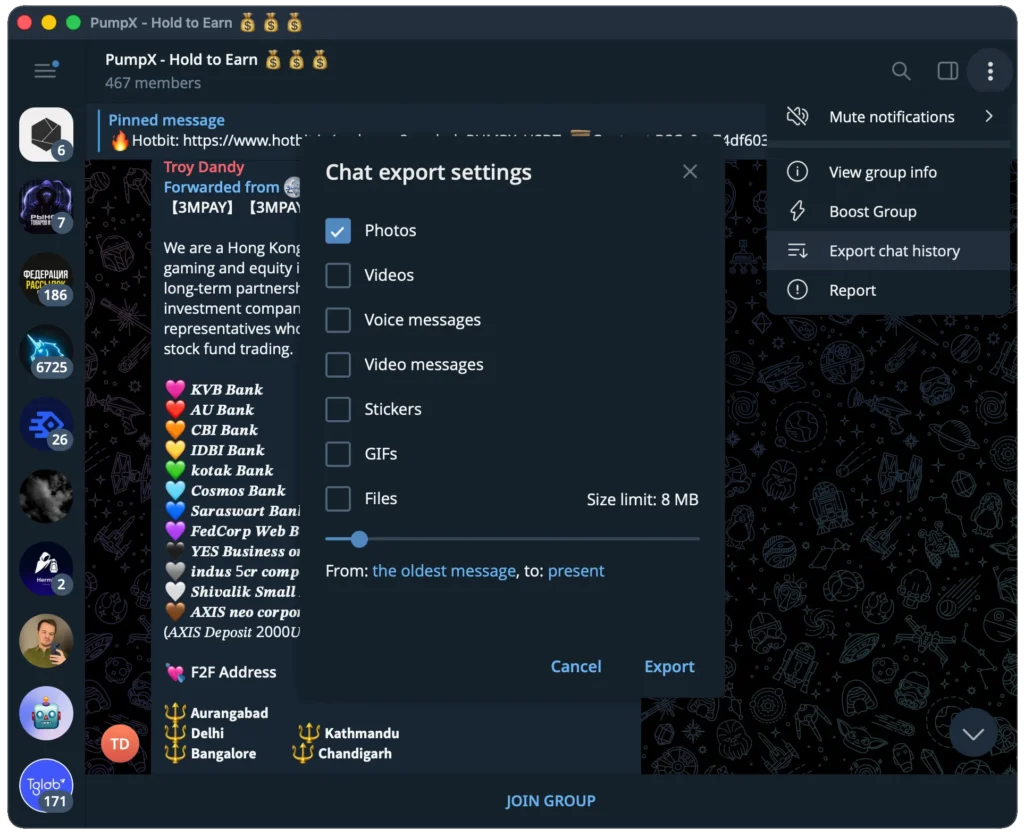
- Export critical conversations through Telegram Desktop via Chats – Settings – Export Chat History, available as HTML or JSON – this is a native, built-in feature that requires no third-party software and works without any special permissions.
- Separate accounts across physical machines or isolated VPS instances – a forced logout on one account triggers the group deletion rule on every account sharing the same device, so isolation is the only way to contain the damage.
- Assign a unique proxy to every single account, one proxy per thread, no exceptions – a shared IP address builds a combined behavioral fingerprint that the messenger reads as coordinated activity, and a single proxy shared across multiple accounts can wipe all of them in one filter event.
- Avoid creating bots within 30 days of any high-risk action – mass inviting, link broadcasting, or adding new contacts at scale all raise account suspicion score, and any bot created in the 30-day window before a resulting reset gets deleted.
- Log the exact creation date of every bot – this lets you assess deletion scope immediately after any forced logout event rather than discovering losses after the fact.
- Respect Telegram’s activity limits – no more than 4 to 5 group or channel joins per 20 minutes, and delays between direct messages of 250 to 500 seconds or longer. Sending as few as 15 identical messages in a row reliably triggers a flood ban even on aged accounts.
Telegram Automatically Logged You Out – Step-by-Step Recovery #
When Telegram automatically logged out your account and the phone number entry screen appears, type your registered number and wait for the verification code. Use the SMS code as the primary recovery method – it is more reliable than QR during a forced session reset. QR login is an acceptable fallback only if the SMS code fails to arrive or is rejected. If your account is tied to an anonymous number through Fragment, the verification code arrives there instead of a physical SIM, and the recovery process works the same way without needing a real phone number. If the code does not arrive within five minutes, wait 10 to 15 minutes before requesting a new one – repeated rapid requests extend the rate-limit window significantly. Entering an incorrect code multiple times increases the lockout interval; some users report waits of several hours after three consecutive failures. Do not request a new code until the on-screen timer reaches zero.
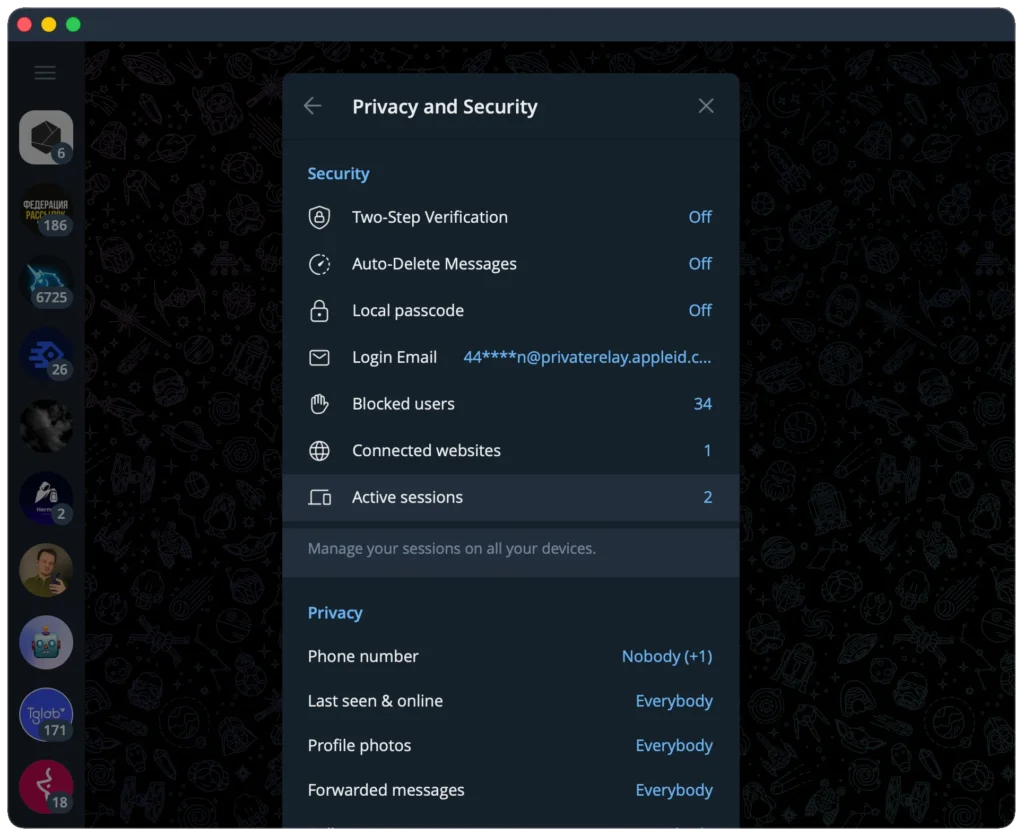
The moment you regain access, open Settings – Privacy and Security – Active Sessions and terminate every session you do not recognize. The list shows device type, approximate location, and login timestamp – enough to tell whether the reset came from the AI filter or from an actual unauthorized login attempt.
If Telegram keeps logging you out again within a day or two of recovery, the original trigger is still active in your usage pattern. The filter logged it during the first reset and monitors for it on re-entry. Stop all outreach and group actions for at least 48 to 72 hours. Resume at reduced volume: fewer messages per hour, longer delays between actions, a fresh proxy on a clean IP. An account that returns to peak activity immediately from the same address typically produces a second session reset within 24 hours of recovery.
Telegram Logged Out Multiple Accounts at Once: Damage Control for Automation Teams #
A simultaneous forced logout across several accounts signals a shared IP as the root cause. When multiple accounts operate from the same address, Telegram’s filter reads the concurrent activity as organized behavior and terminates all associated sessions in a single sweep. Our analysis of this problem across multiple real-world reports confirmed that account isolation on separate VPS instances with individual proxies eliminates the group-reset pattern in the overwhelming majority of cases. Restore accounts in sequence, not simultaneously – concurrent re-logins from the same IP address compound the suspicious behavioral signal and produce another reset cycle before any account fully recovers.
For teams running large account pools, structured warm-up before any campaign is a hard requirement, not an optional step. Telegram Prime includes a dedicated account warm-up module with configurable behavioral patterns – the knowledge base covers field-tested methods for reducing forced logout frequency when working with account pools at scale.
Replace all proxies before resuming any activity after a group logout event. Previously used IP addresses carry a behavioral flag from the reset; returning to them triggers another termination cycle. Each account needs a fresh proxy, varied interaction timing, and a message volume well below its previous operational level for the first 72 hours. Sessions created with mobile device parameters hold up significantly better than tdata or desktop sessions under equivalent load – they enter frozen or spam-blocked states less frequently and recover faster after a filter event. Telegram’s monitoring continues after the reset lifts – an abrupt return to peak operational pace reads as an anomaly and feeds directly back into the filter. Gradual, patient scaling is the only recovery path that holds.
How to Prevent Telegram from Logging You Out Again #
Telegram logged out of all devices once because a behavioral pattern crossed the filter’s threshold – it will happen again if that pattern persists after recovery. Isolate every account by device and proxy, export message history before any campaign launch, and allow 72 hours of low-activity warm-up after any forced reset before scaling back toward normal volume. For teams managing large account pools, the current Telegram limits guide for 2026 and the account unfreeze walkthrough in the Telegram Prime knowledge base document practical, tested approaches to reducing session reset risk at operational volume. The full knowledge base at telegramprime.ru covers proxy setup, account limits, warm-up configuration, and spam-block diagnostics – start there before scaling any account pool back to full capacity.
#
FAQ about departure from all sessions #
Why did Telegram log me out of all devices at the same time?
Telegram terminates all active sessions simultaneously through an internal AI security filter. This is not a hack and not a technical error. The filter triggers on behavioral patterns: sending links to new contacts, joining groups protected by anti-spam layers, enabling a VPN during bot creation, or logging into one account from two different IP addresses at the same time. Telegram does not publish the exact trigger criteria anywhere in its documentation.
How do I get back into Telegram after being logged out of all devices?
Enter your phone number in the app and wait for an SMS verification code. QR login and authorization through another device are disabled at this stage. If the code does not arrive within five minutes, wait 10 to 15 minutes before requesting a new one. Sending repeated rapid requests extends the lockout window and can push the wait to several hours.
Why did Telegram delete my messages after logging me out?
After a forced session reset, the messenger automatically removes outgoing messages. This now happens within one day – before 2024 the window was three days. The deletion affects outgoing messages only. Cloud-stored account data including contacts, username, and profile photo stays intact.
Can deleted Telegram messages be recovered after a forced logout?
No. Telegram does not store backups of deleted conversations, and its API provides no access to removed message data. Services offering paid message recovery have no technical basis for the claim. The only protection is exporting important chats through Telegram Desktop before a forced logout event occurs.
Why did my Telegram bots disappear after I was logged out?
Telegram removes every bot created from the affected account within the 30 days preceding the logout event. The cutoff is calculated from the bot’s creation date, not the logout date. Bots older than 30 days at the time of the event are not affected.
What should I do when multiple Telegram accounts get logged out at once?
A shared IP address is almost always the root cause. Assign a fresh individual proxy to each account, then restore accounts one at a time rather than all simultaneously. Concurrent re-logins from the same address amplify the suspicious behavioral signal and trigger a second reset cycle. After restoring access, keep each account at low activity for 48 to 72 hours before returning to normal volume.
Why did my Telegram notification settings reset after the ban was lifted?
When Telegram lifts the restriction, it resets all notification settings tied to the specific device back to factory defaults – the values that existed at the moment of account registration. This is expected behavior from the messenger, not a bug or a sign of remaining account issues.
How do I stop Telegram from logging me out again?
Keep each account on a separate device or VPS instance with its own dedicated proxy. Never open one account from two different IP addresses at the same time. Stay within Telegram’s activity limits: no more than 4 to 5 group joins per 20 minutes, and delays of at least 250 seconds between direct messages during any outreach. After any forced logout event, maintain low-intensity activity for 48 to 72 hours before scaling back to your normal working pace.


